When Every Second Counts: Mobile Solutions for Safety & Emergencies
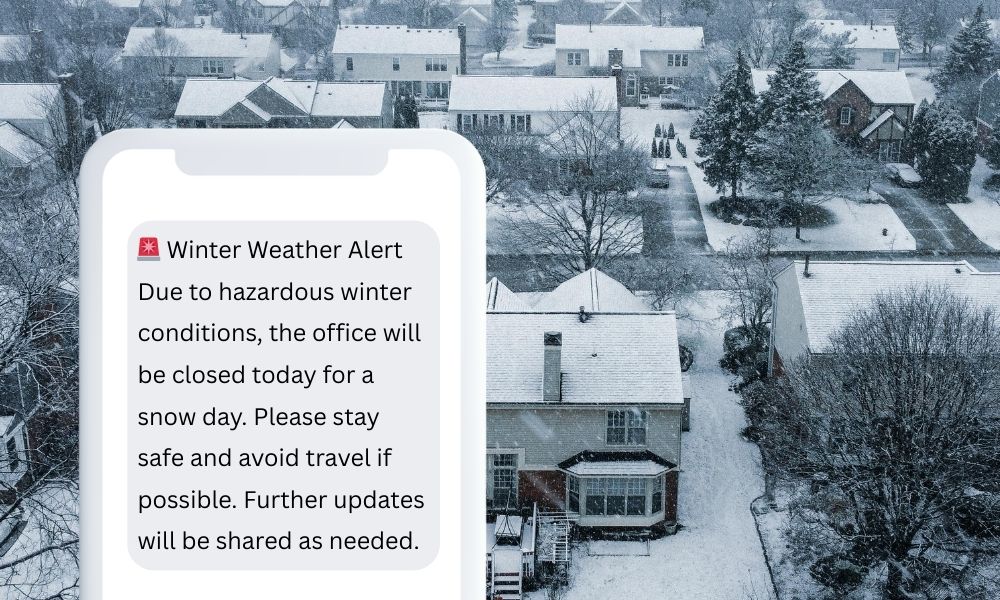
Learn how organizations are using mobile communication tools to send real-time emergency alerts, share critical updates, and coordinate response efforts more effectively—keeping people, facilities, and operations safe without adding complexity. Transcript below.
Brittany Lawson [00:05–00:17]: Alright, we are here for our Safety and Emergencies webinar. Hey, Patty. You too. Happy Friday Eve!
Patty Ruland [00:13–00:21]: Hey, Brittany! So great to see you. Okay, yes, it is.
Brittany Lawson [00:23–00:50]: I think we do have a few people in already, so we’ll just give a couple more minutes for some people to join. Once you’ve arrived, go ahead and drop your name, maybe your organization, and where you’re joining us from in the chat. We’d love to see where everybody’s from around the country—or the world, who knows?
Patty Ruland [00:49–00:50]: Absolutely.
Brittany Lawson [00:52–01:04]: I’m coming to you from Central Illinois, the Peoria area, and it is 56 degrees right now, which is a heat wave for us in February.
Patty Ruland [01:05–01:13]: Oh my goodness. I am live from Las Vegas.
Brittany Lawson [01:13–01:18]: Way more exciting than Peoria, Illinois.
Patty Ruland [01:18–02:09]: Looks like we have Dave joining us from Nashville. We have Shannon from Blue Star Growers in Cashmere, Washington—that sounds fun. I see we have some other folks as well. Don’t be shy, come on and introduce yourselves. I see Jodi, Jenny, Ed, and Diana. We’ll give it one more minute and then we’ll go ahead and kick this off. We’ve got Ed from Spokane, Washington. Maybe we can have Shannon from Cashmere and Ed from Spokane bringing people together, one webinar at a time.
Brittany Lawson [02:15–03:06]: Alright, I’m sure people will straggle in. Let’s go ahead and kick it off. We are here today to talk about safety and emergencies—things that we deal with all the time. Anything could pop up, but what’s important is making sure you have a plan in place when something does happen. You want to be able to communicate with everyone in a timely manner so that we’re all reacting appropriately to whatever arises. Today we’ll talk about our mobile solutions that some of our clients are using, and we’ll also share ideas we’ve discussed with other organizations. I’m sure you’ll think of ideas as well on how to use these tools to build a better plan surrounding safety.
Patty Ruland [03:06–03:24]: If you want to go ahead and share your screen, Brittany, that would be great. And as a reminder, if anybody has any questions as we’re going along, we’ll try to address them when they come up, but if not, we’ll circle back. Please feel free to type any questions you have in the chat box.
Brittany Lawson [03:25–03:58]: Absolutely. We’re going to be doing a little bit of demo as well. It’ll be interactive—we’ll do some texting so you can see what it’s like on the end-user side. So if you’ve got your cell phone nearby, have that ready because we’ll have you test out a couple things. Alright, well, thanks for joining us today. I am Brittany Lawson. I’ve been with Engage by Cell for about three-plus years. I love what I do, and talking about using mobile has been amazing. We work with so many different industries.
Brittany Lawson [03:59–04:47]: One of the more unique ones, but one that just makes total sense, is safety. For example, this morning my power went out. That’s a safety issue in my world—if the power goes out, there are a lot of things I need to know or turn off or unplug to make sure everything stays safe and doesn’t cause problems. I received text messages from my electric company letting me know there was a power outage, when the estimated restoration time was, and when it was back on. That’s just a simple example. But yes, I’ve been with the company for over three years and I truly love our solutions. You guys will really enjoy the conversation today. Patty, do you want to introduce yourself?
Patty Ruland [04:55–05:37]: Sure. My name is Patty Ruland. I’ve been with Engage by Cell for the better part of a decade. I also love the folks that we work with. We provide services that cross all industries, basically for engaging and communicating with people. So this safety webinar fits right into that. I also know we have a couple of existing or current clients on the call, so this might be a bit of a review for you, but bear with us—there’s always something new to learn about our platform. And again, any questions, go ahead and throw them in the chat window.
Brittany Lawson [05:37–05:41]: Do you want to go ahead and advance the slide?
Patty Ruland [05:42–06:39]: Sure. Just a little bit about Engage by Cell: if you’re not familiar with us, we are U.S.-based and headquartered in San Francisco, although many of us are remote employees. We provide cloud-based mobile communications in the form of mobile web apps and text messaging. We’ve been around for over 20 years—like I said, I’ve probably been here for at least half that time. In addition to safety, we support training, wayfinding, guided tours, fundraising, and even platforms for human resources. So as I mentioned earlier, we can really serve any type of industry with our services.
Brittany Lawson [06:40–06:46]: Absolutely. It comes to you as a clean slate, so you can make it whatever you need it to be, which is great.
Patty Ruland [06:47–07:13]: The two main things we’re going to talk about today are our text messaging platform and our mobile web apps. Brittany will talk a bit about text messaging, and I’ll cover mobile web apps. We’ll also push out some messages and have you opt in so you can see in real time how the platform works.
Brittany Lawson [07:14–08:28]: Let’s go ahead and get started with that test. One of the ways our texting can be used is not only by uploading a list, but also by having people opt in on their own. Let’s have everyone try that so you can see how it works. This QR code—go ahead and open your camera app and scan it. When you scan it, you’ll click the pop-up bubble and it will populate the text for you. It makes self-opt-in really easy. You’ll be sending the text “demo safety” to 56512. If you did it correctly, you’ll get an automatic reply. You can set up links in your reply—this link goes to a safety video, but it could go to your website or a page in the mobile web app. The sky’s the limit, and you can customize what that reply looks like. QR codes are a fabulous way to let people know they have an easy way to stay in the loop about alerts.
Brittany Lawson [08:29–09:00]: Another thing you can do with text messaging—can you see my screen okay? When my power went out this morning, it decided to mess up my second screen, so let me move my slides over to the other screen here.
Patty Ruland [08:55–09:17]: And while Brittany’s doing that, I just pulled up the back end of our system and I can see everybody who has texted in or opted in via the QR code. Great—thank you for doing that. That will allow us to push some texts out to you and show you in real time how it’s working. How are you doing there, Brittany, with the slideshow?
Brittany Lawson [09:23–09:43]: There we go, it’s finally working for me. Sorry, guys. Okay, there we are. Can you see it okay, Patty?
Patty Ruland [09:42–09:43]: Absolutely.
Brittany Lawson [09:44–10:33]: Perfect, thanks. You can text in a word to join an overall list. In this first example, you’ll see two different keywords. You can have multiple keywords so your overall list can branch into smaller, segmented lists. Maybe some people want safety alerts, while others want HR alerts, and others want volunteer opportunities. They could text the word “volunteer” to get texts about volunteering at their workplace. So inbound texting is great for joining specific lists, and with outbound texting, it’s really easy to push any alerts you might need in a matter of seconds.
Patty Ruland [10:33–10:44]: I’m just going to jump in here. You guys can’t see me, but I’m about to click a button and send a text message to all of you.
Brittany Lawson [10:45–11:24]: Go ahead and do that so we can see what it’s like to receive it. It’s very quick—I just got mine. And you’ve got a nice call to action in there too. That’s a great way to utilize the tool if you want to see who is actually engaging with you or gauge interest. For example, you could ask employees to reply with a specific word to show interest in a certain activity.
Brittany Lawson [11:24–12:07]: Text chat is another tool within our texting platform. It’s a really neat feature that allows simplified back-and-forth communication. If someone has a question, they can text in and someone on your staff can manage the conversation mode and respond directly, creating a simple Q&A experience. MMS alerts are also available—those include images, GIFs, or graphics. You can personalize your text messages. For safety, you could send something like a road closure image, or for other uses you could make messages more engaging with visuals.
Patty Ruland [12:07–12:19]: Absolutely. Do you want to talk about how some of our clients—or one client in particular—uses our platform?
Brittany Lawson [12:19–13:51]: Yes. One client, a university, specifically uses our Express SMS, which is a mobile-friendly version of our texting platform. It’s simplified so you can send text messages from anywhere. Patty used her desktop just now, but she could just as easily send messages from her phone while out and about. That’s especially important for emergencies like weather alerts or campus safety notifications. The university’s overall system was more limited and relied on preset templates with restricted access. A specific department needed more flexibility and immediate communication, so they set up their own account with Express SMS. This allowed them to send alerts directly from their phones without needing to rush back to a computer. Emergencies don’t wait for convenience, so you need to be able to send alerts wherever you are. You can also have multiple administrators, templates, and segmented lists such as staff lists or student lists, which makes it very flexible.
Patty Ruland [13:51–14:29]: And it’s not just for emergencies. It can also be used for reminders. I’m going to push out another quick text to you all—I’m hitting send now to subscribers. That’s just a simple reminder about an upcoming meeting. These can be targeted to specific departments or sent company-wide. The great thing about our platform is that you can have an unlimited number of lists, so you can segment your audience as needed and provide messaging to the people who specifically need it.
Brittany Lawson [14:29–15:25]: Absolutely. The other tool we’re going to discuss today is mobile web apps. Text messaging is awesome, and mobile web apps are awesome—they work even better together. Patty will tell you a little more about mobile web apps.
Patty Ruland [15:25–16:13]: Yes, absolutely. If you’d like, you can scan the QR code on the screen, and it should take you to the mobile web app. People often ask, “Why a mobile web app if we already have a website?” The reality is that websites or intranets can be difficult to navigate. Employees often wonder where to find specific information. A mobile web app is a curated portal where you can provide the most necessary information in one easy place—benefits, training, onboarding, and more.
Patty Ruland [16:13–17:33]: It also supports engagement tools. Many clients use it for yearly training, where employees watch a video and answer questions, which is great for compliance testing. Another benefit is providing an easy way to report incidents. We work with a large plumbing organization whose employees use the app to report incidents or unusual situations, even something like a suspicious person around the premises. You can also run employee feedback surveys and manage annual processes. It’s a simple, organized package for employees to access important information.
Brittany Lawson [17:33–17:56]: Absolutely. One thing to note is that these are two very different web apps because they’re fully customizable. You can match your branding, change the icons, and highlight whatever information you want people to access quickly. It’s all drag-and-drop and doesn’t require a technical background.
Patty Ruland [17:56–19:33]: Absolutely, and we have a great training and support team. With our organization, you deal with real people—not bots or automated systems giving canned responses. You’re working with real individuals who help you use the platform for maximum results. Here’s an example of one of our clients with a very large campus. They had challenges directing people where to go during emergencies. It reminded me of school fire drills—usually chaotic but guided by staff. Now, with automation, you can receive information on exactly where to go and even conduct personal inventory to ensure everyone is accounted for. It’s all automated. You can even add employees who were not initially on a list. As you’ve seen with the texts and QR scans, it’s very responsive and saves time and effort, reducing the burden on staff and freeing up more time in their day.
Patty Ruland [19:33–21:13]: We also work with a large tire manufacturer that didn’t have an intranet for training, safety, or onboarding. They created mobile web apps for each location. New employees could upload a photo, introduce themselves to coworkers, and access all location-specific information. This completely streamlined their processes. HR was no longer getting dozens of calls during onboarding sessions. Employees appreciated the simplicity because they could complete everything quickly on their phones and on their own time.
Brittany Lawson [21:16–21:44]: Absolutely. As you can see, there are many different use cases for both mobile web apps and text messaging. These platforms come to you as a clean slate, so I’m sure your wheels are turning on different ways you could use these tools. Safety, emergencies, and HR are definitely very popular use cases with our clients.
Patty Ruland [21:44–22:41]: Absolutely. We have a few minutes left, so I’ll open it up for questions. Feel free to type them in the chat window. As I mentioned, I know we have some existing clients on the call, so this might be a bit of a refresher. You’re also welcome to take a screenshot or picture of this page and contact us if you think of any questions later. And as our marketing associate just shared in the background, we did record this session and will send out the video recording tomorrow via email. Our team will also reach out to see how we can help you further.
Brittany Lawson [22:41–23:12]: Absolutely. If you’d like a demonstration where we talk more personally about the specific obstacles your organization is facing, we’re happy to explore how these tools could help. Hopefully we get to discuss things further with each of you and support your safety and emergency measures by implementing tools like these. Thank you all for joining—we appreciate it.
Patty Ruland [23:13–23:21]: Excellent. Thanks so much, and again, from myself, Brittany, and the entire team at Engage by Cell, we appreciate your time. Have a great day.
Brittany Lawson [23:21–23:22]: Bye, everybody.


