Simplifying access to sentencing resources

How Sentencing Commissions Can Make Critical Information Easier to Access

Sentencing commissions manage a tremendous amount of information that probation officers, attorneys, court personnel, and other criminal justice professionals need to access quickly and accurately. Mobile technology can make that information easier to find, use, and keep up to date—whether someone is in the office, in the field, or in the courtroom. From searchable sentencing resources and mobile manuals to text alerts and training information, simple mobile tools can help put critical information directly into the hands of the people who need it.

The Virginia Sentencing Commission offers a great example of how these tools can be put into practice. Here are four ways mobile technology can support sentencing commissions and the professionals they serve.
CRIME CODER

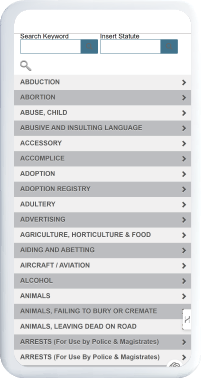
Throughout Virginia, probation officers and attorneys rely on Crime Coder to identify:

• Sentencing guidelines offenses

• Statutes for criminal offenses

• Corresponding penalty structures

• Offenses designated by the Code of Virginia as violent offenses

Users enter a search term or a partial statute into Crime Coder where they can then view requested information on their smartphones.

MOBILE MANUAL Similar to our physical sentencing guidelines binder, the Mobile Manual includes the same information but instead can be conveniently stored on your smartphone. Designed for a mobile device and not a PDF, the manual is divided by section, neatly displayed, and can be brought into the courtroom for use during sentencing.
MOBILE MANUAL

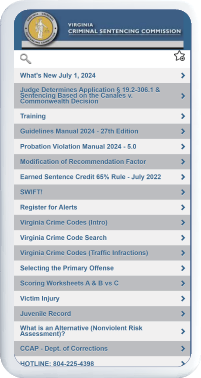
Similar to our physical sentencing guidelines binder, the Mobile Manual includes the same information but instead can be conveniently stored on your smartphone. Designed for a mobile device and not a PDF, the manual is divided by section, neatly displayed, and can be brought into the courtroom for use during sentencing.
MOBILE WEBSITE

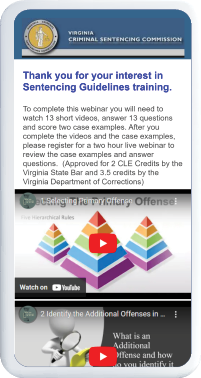
Our mobile website lets users quickly connect to the Mobile Manual and Crime Coder. They can contact staff by calling, texting, or emailing questions straight from their mobile devices. Plus, any content on the mobile website can be easily updated to address current topics or issues. The mobile website allows users to:

  • Register for training seminars
  • Get driving directions to training facilities
  • Access FAQs and related documents that can be used in court
  • Save a link to their smartphones so they can obtain any information, from the Code of Virginia to the complete guidelines
TEXT MESSAGING

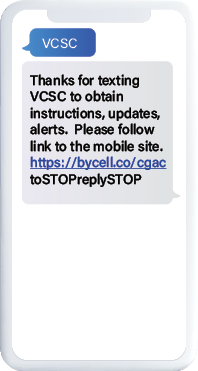
We use text messaging to address changes to sentencing guidelines or to correct common errors and is an efficient and powerful way to promote accurate completion of sentencing guidelines.

Share
Previous Post
Next Post
K&L Distributors Simplifies Customer Raffle with Text Messaging
How Sentencing Commissions Can Make Critical Information Easier to Access
Reduce No-Shows. Save Staff Time. Improve the Jury Duty Experience.
Banner Health Streamlines Onboarding & HR with Mobile Apps
Mobile Communication and Productivity Tools for Healthcare Professionals
Leadership That Works: Building Accountability, Trust, and Team Performance
From Chaos to Coordination: Event Communication Strategies from Taste of Madison
Turn Texts Into Conversations That Drive Engagement
What's Working in Adult Education Outreach
Smarter Outreach for Workforce Teams
Put Your Downtown on the Map: Mobile Tools That Drive Engagement
Texting & Mobile Tools for Workforce Programs
Texting & Mobile Portals for Training on the Go
How Circuit Clerks Are Using Text Messaging to Improve Jury Duty Communications
When Every Second Counts: Mobile Solutions for Safety & Emergencies
Text Chat for Case Management: Faster, More Effective Participant Communication
Unlocking Workforce Success with Mobile Tech
Reimagining Youth Workforce Engagement with Mobile Innovation
Reimagining Employee Communication: How California Academy of Sciences Drives Training & Engagement
Transforming Visitor Connections: Mobile Experiences that Drive Cultural Engagement
Text Messaging for Outreach 101: Learn Marketing Strategies That Work
Tech and Tactics for Thriving Through Funding Cuts
July 2025 Newsletter
June 2025 Newsletter
May 2025 Newsletter
April 2025 Newsletter
March 2025 Newsletter
Texting Tools for Case Managers
Curious About HR Texting Tools & Apps? Demo + Open Forum
Naval Aviation Museum Launches “Flight Plan” Mobile Web App
From the Floor to the Field: Tristar Glass Stays Connected with Mobile Tools
Training in the Age of Distraction: Learning Design and Mobile Strategies that Grab Learners’ Attention
Ask Us Anything: Live Demo of Mobile Tech for Workforce Development
Mobile Technology Fills Big Communication Gaps in Times of Funding and Staffing Uncertainty
Beyond Brochures: How Mobile Technology Is Transforming City Attractions and Amenities
A Smarter Way to Increase Meeting and Event Participation
Adult Education Panel: Empowering Lifelong Learning Through Mobile Technology
Storytelling with Data: Making the Case for Technology Upgrades
Convince Your Boss: How to Identify the Right Tools & Set up Your Team for Success
Atlanta Botanical Garden Transforms Holiday Light Show with Geofencing & GPS Maps
Workforce Board Innovates Program Outreach: Launching a New SMS Campaign and App
6 Event Marketing Fails and How to Fix Them
Using Technology to Meet the Needs of Today’s Job Seekers
Event Hacks: Simple Tech for Event Managers
Demo: The Power of Text Messaging for Every Industry
Tech Trends for Museums and Attractions
The Science of Play at Work: Games for Greater Performance
What Workforce Professionals Need to Know About Apprenticeships
Community Resources and Distribution with Mobile Technology
How Does a Text messaging Platform Work?
"Should Your Non-Profit Attraction Invest in an Online Map?"
Better Team Communication: Break Barriers & Boost Productivity
Let's Talk Tourism
Workforce Partnership Revamps Statewide Communication Strategies
Goodwill's Strategies for Effective Workforce Communication
ACE Disposal Streamlines HR, Training, and Safety
Middlesex County Connects Job Seekers with Employers
Expert Panel on The Future of Visitor Services
Panel on Engaging Adult Education Students with Texting & Apps
HR & Training Guide to Effective Engagement
Learn How to Implement Text Messaging in Your Organization
Visitor Management Goes Mobile: Replace Aging Check-In Processes
Why Organizations Deploy Text Messaging, and How to Get Started
Amusement Park Eases Visitor Concerns with GPS Maps and Texting
Grant Management 101: Meet the Experts
Simple Ways to Implement Sustainable Tourism
Text Messaging and Mobile Web Apps Supported by WIOA Funds
Overworked Departments Embrace Mobile Tech to Improve Outreach
New Mobile Technology + AI Makes Strides in Workforce Development
Government Agencies Embrace Technologies to Improve Engagement
Destination Salem Leverages Smartphone Tour and GPS Mapper
Popular Park & Museum Find Success in Mobile GPS Maps & Apps
Greenburgh Public Library’s Ground-Breaking App Initiatives
WIOA Funding Now Available for Text Messaging
Introducing Mobile Technology in Safety Training & Communications
Engaging Students & Visitors With a Mobile Audio Guide
Microlearning & Mobile: Sticky Content with Efficient Delivery
Staff On-The-Go? This Casino Turns to Mobile to Increase Engagement
American Synthetic Rubber Co Empowers Employees with Mobile
Workforce Organization Reaches Job Seekers through Texting
HR Team Cuts Confusion with Mobile Resource Hub
How This Medical Center Trains and Supports Nonstop Staff
Engage By Cell Announces ChatGPT Integration
ChatGPT Improves Performance: Expert on AI In Everyday Work
10 Expert Tips to Boost SMS Marketing Platform Opt-Ins
Klehm Arboretum's Seasonal Smartphone Tour
Museum Expert on Steep Declines in Attendance and Engagement
Improving the Employee Experience with Today's Tech
10 Ways to Improve Emergency Response and Safety Training
Tufts Medicine Upgrades Onboarding & Leadership Training via Mobile
Text Message Marketing Expert Talks Implementing Texting
So You Want to be a Trainer? Subject Expert vs Trainer
Top 10 Text Messages sent by WFD Organizations Today
Native Apps vs Mobile Web Apps: What's the Difference?
Navigation Solution Solves Visitor Challenges for Art Facility
Breaking the “Unemployment Office” Stigma
Student Created Digital Content for Immersive Campus Touring
How Digital Processes Continue to Improve Employee Health & Safety
GPS Mapper Use Case: Missouri Botanical Gardens
A Van Gogh Audio Guide at The Detroit Institute of Art
Contact us for a demo and pricing
Message (optional)
Thank you! Your submission has been received!
Oops! Something went wrong while submitting the form.